

Our SDK supports Social Sign In using OIDC with the implicit flow. Currently supported OIDC providers include:Documentation Index
Fetch the complete documentation index at: https://sequence-0fb8d9e6-unreal-quickstart-with-marketplace.mintlify.app/llms.txt
Use this file to discover all available pages before exploring further.
- Google -> Builder Setup
- Apple -> Builder Setup
Editor
For social sign in to work in the editor, you will need to deploy a simple server on your local machine. We provide a sample implementation here. To deploy this sample server, please perform the following.- Download and install Go: https://go.dev/dl/
- Open a terminal/command prompt and verify your installation by typing
- Create a directory for your go project and a main.go file
- Copy + paste the gist into the main.go
- Initialize the project by creating a go module
- Run the server
- You should see
Server listening on port 8080printed to your terminal/command prompt
OpenIdAuthenticator.RedirectUrl in your code before initiating the sign in process
http://localhost:8080/ (or your server url) whitelisted as a redirect url under Standalone Platforms in SequenceConfig
iOS
Sign in with Apple
This SDK supports native Sign in with Apple via the popularapple-signin-unity package. This requires the Sign in with Apple capability in XCode in order to function. Provided you have imported the Setup scripts via Package Manager > Samples and/or have SignInWithApplePostprocessor.cs under an Editor subfolder, this capability will be added to your XCode builds automatically.
Please be aware that this capability is not supported by Personal Teams.
Other Social Platforms
All other social platforms are supported by default, just be sure to add your client IDs inSequenceConfig.
MacOS
- Open the Windows/Mac/Linux Player Settings window (menu: Edit > Project Settings > Player Settings, then select Windows/Mac/Linux).
- Select
Other Settings, then scroll down toMac Configuration. - Expand the
Supported URL schemessection, and add 1 to the size. - In the new
Element Nfield, enter the URL scheme you’ve configured inSequenceConfig.
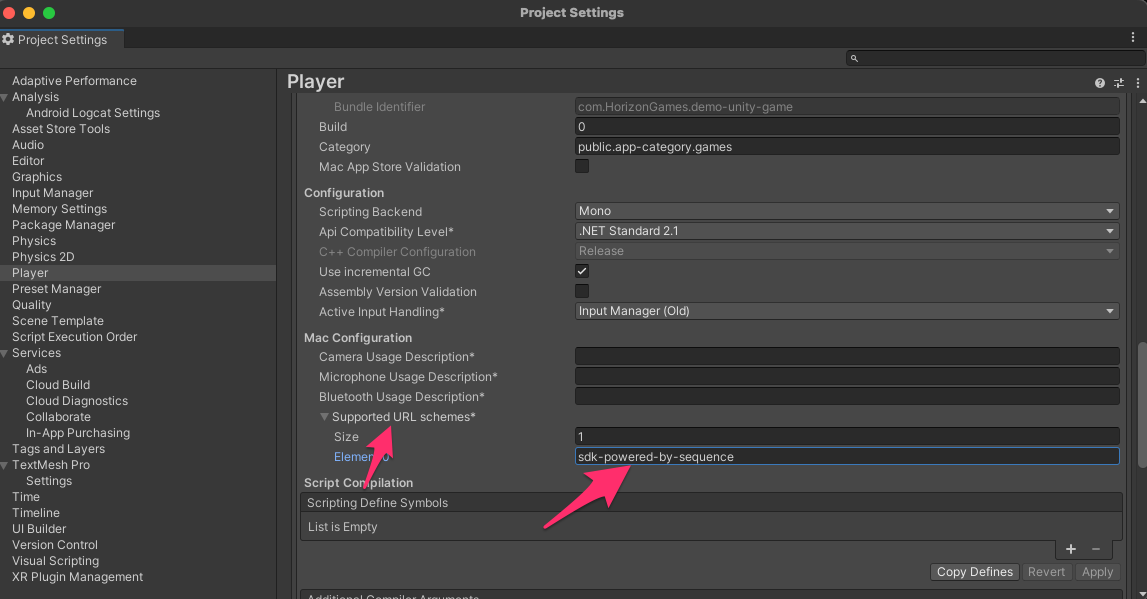
PC
No additional steps required.Android
- In the Project window, browse to
Assets > Plugins > Android.
Edit > Project Settings > Player and under the Android Publishing Settings, enable Custom Main Manifest in the Build section. See https://docs.unity3d.com/Manual/deep-linking-android.html for more info.
- If it doesn’t already exist, create a new file and name it
AndroidManifest.xml. - Paste the following XML into the file, or, if you already have one, add the new keys from this XML to it.
- Make sure to replace ‘sdk-powered-by-sequence’ with the Url Scheme you set in
SequenceConfig
2022.3.7f1 and 2023 versions prior to 2023.1.7f1, 2023.2.0b3, or 2023.3.0a1 contain a bug with Android deep-linking. Please use this XML instead.
<meta-data android:name="unityplayer.UnityActivity" android:value="true" /> after your first intent-filter. Please see https://forum.unity.com/threads/deep-linking-in-unity-2022-the-app-is-restarted.1447300/ for more info.
Web
Social sign in on Web platforms uses React via the WebGLTemplate found underWebGLTemplates/SequenceReact. This has been validated on WebGL and WebGPU. To learn how to enable WebGPU in Unity, please see this forum post.
Please note that Google is the only OIDC provider currently supported on Web platforms by our default SequenceReact WebGLTemplate; however, you are welcome to expand upon it to add support for the other OIDC providers supported by our API.
One-time setup
Drag thisWebGLTemplates folder under Assets (or just drag the SequenceReact template into your existing WebGLTemplates folder is you already have one) such that you have Assets/WebGLTemplates/SequenceReact.
Once you’ve added the SequenceReact template, you’ll want to restart the editor so that Unity picks up your newly added template.
From here, you can select the template under Project Settings > Player Settings > Resolution and Presentation.
Building
After the one time setup, when you build your Unity project on Web platforms it will be built as part of a React project.- Open up a command line at the root of your new build
- Install pnpm if you don’t already have it
pnpm installto install dependanciespnpm devto run the project on your localhost (defaulting to port 4444 - configurable inSequenceReact/package.json)- Open http://localhost:4444